

TL;DR - Modern data platforms like Databricks, Snowflake, and Google Cloud now include embedded AI capabilities from natural language interfaces to intelligent agents. Yet most organisations utilise less than 20% of these features. This blog explores key AI capabilities and foundations needed to maximise their effectiveness.
In our work at a large retail organisation, we observed that, although they have a sophisticated data platform, their analysts still spend more than half their time on low-value tasks such as data validation and dashboard preparation rather than generating insights. They navigate between CRM systems, BI tools, and Excel, manually stitching together answers to questions that AI could surface instantly.
This is not a technology problem. It’s an implementation gap, where organisations fail to activate existing features in ways that deliver tangible business value. These features may already be paid for, making activation cost-effective and enhancing the value realisation of your data investments.
Let’s look at the why and how of activating key AI features in any modern data platform.
Benefits of Activating Intelligent Features in your Data Platform
Here are some example use cases - of course, the possibilities with AI are limitless!
Intelligent Anomaly Detection
AI learns normal patterns and flags unusual changes in real time, such as a 15% spike in acquisition costs within a segment. Unlike scheduled reports, it operates 24/7, so issues can be addressed immediately.
Business Outcome – Operational Efficiencies & Cost Control
Our client wanted to flag anomalies in their financial reconciliation process. Intelligent anomaly detection allowed the finance team to shift from reactive reporting to proactive monitoring. Month-end close times dropped, revenue restatements decreased, and confidence in data quality increased.
Natural Language Analytics
Conversational BI lets users ask questions in plain English. “Why did revenue drop this month?” The AI provides instant explanations, visualisations, and deeper drill-downs.
Business Outcome – Increased Decision Velocity
Teams no longer wait on analysts or navigate complex tools. You get faster decision cycles, reduced request queues, and broader data literacy.
Automated Semantic Documentation
Large organisations often struggle with inconsistent definitions of basic business terms. Over time, these inconsistencies grow as team members, reporting requirements, and underlying models and data sources change.
AI-driven semantic layers now standardise and auto-maintain business definitions across teams. For example, imagine the finance and sales teams each use a different definition of “credit limit”. An AI agent automatically detects this inconsistency by scanning SQL files, model lineage, and relevant documentation.
When it identifies the conflicting logic, the agent alerts both teams and prompts them to resolve the mismatch. Once the teams agree on a unified definition, the agent updates the documentation automatically so the new standard is visible to everyone.
Business Outcome – Accelerated Project Delivery
With a single source of truth, organisations avoid reporting misalignment and build dashboards and models on consistent, business-approved definitions, accelerating project delivery across teams.
AI Features to Explore in Your Data Platform
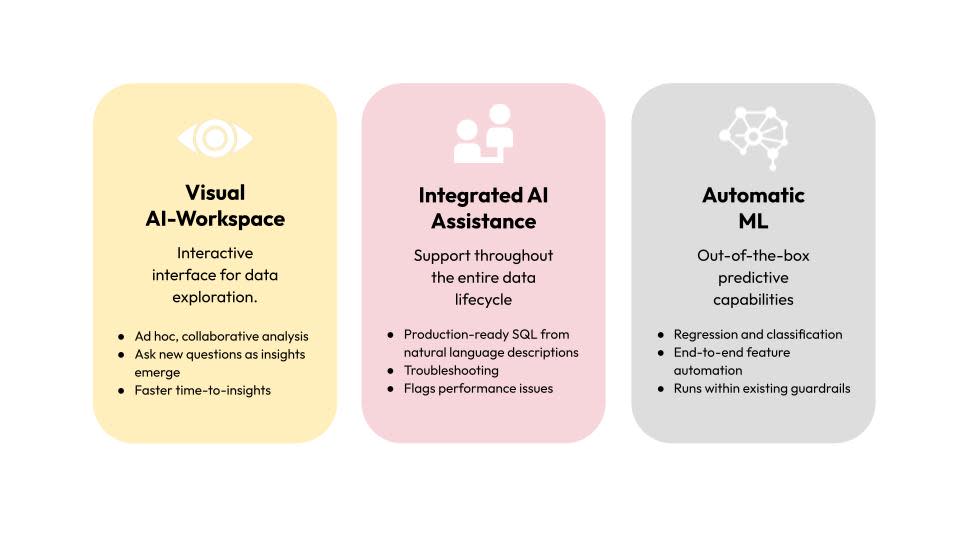
Visual AI-powered Workspace
This is an interactive, drag-and-drop interface for exploring data and building transformations. Teams can collaborate and obtain insights faster with AI assistance.
BigQuery DataCanvas is a leading example. Powered by Gemini, it allows users to query, transform, and even generate chart-based visuals using natural language.
DataCanvas works by internally building a directed acyclic graph (DAG) representation of your data pipeline. It is a set of connected steps that define how data moves throughout your analysis. Each step is a node, and arrows indicate how data flows between operations. Users can branch off at any stage to explore alternative paths, revisit previous steps, or compare multiple outcomes side by side.
Data Canvas supports several node types.
Node Type | Definitions | What can users do? |
Table Node | It represents the tables executed within the user’s workflow | View the table schema and the metadata Preview the sample data |
SQL Query Node | It executes the custom SQL query directly within the canvas. It allows users to write their own SQL query or generate the SQL code through natural language | Write SQL manually Use natural language to generate SQL Edit / Debug the generated SQL Execute the SQL query and see the inline results |
Visualisation Node | It generates the visuals based on the query results. | Edit the visuals Export the visuals |
Insights Node | It helps users generate insights and summarise trends and patterns. | Delete the node Duplicate the node |
LakeView Dashboards in Databricks, Snowflake with Cortex Analyst, and Amazon Q in QuickSight offer similar features.
These features are suitable for ad hoc, collaborative analysis for non-technical users. You can perform iterative analysis, asking new questions as insights emerge. However, as at the time of writing, they struggle with complicated data structures such as nested JSON files.
Integrated AI Assistance
Powerful large language models such as OpenAI’s GPT, Google’s Gemini, and Anthropic’s Claude are already contributing significantly to day-to-day work. Several data platforms have one or more of these models integrated directly as assistants. Examples include Databricks Assistant, Gemini in BigQuery, Amazon Q for Amazon Redshift, and Snowflake’s Cortex Analyst Copilot.
AI assistants can integrate AI throughout the entire data lifecycle, saving users time on repetitive tasks while improving analytics quality. They also lift the technical capability of the broader team. For example, they can generate production-ready SQL from users’ natural language descriptions. They can explain and troubleshoot code line by line, flag performance issues, and recommend best practices.
Automatic Machine Learning
Modern data platforms include out-of-the-box machine learning (predictive AI) capabilities. BigQuery AutoML, Databricks AutoML, Amazon SageMaker Autopilot, and Cortex ML Functions in Snowflake allow even non-technical users to build and use predictive ML models quickly.
Typically, AutoML supports two major models:
Regression to predict actual future values
Classification to assign value categories
You don’t need to worry about managing underlying ML infrastructure (such as orchestrating the pipelines & maintaining the ML servers) or writing machine learning code. AutoML provides end-to-end machine learning feature automation, including data processing, feature engineering, hyperparameter tuning, cross-validation, and model ensembling. It also runs everything within existing guardrails, ensuring security and compliance.
As at the time of writing, AutoML limitations do not support user customisation of the auto-generated ML model. The input size is also limited to 100 GB. It is not the best choice if your use cases require more complex machine learning models or fine-tuning the underlying model architecture, loss functions, etc. However, it can handle anomaly detection, benchmarking business process performance, revenue/sales forecasting, and several similar business use cases.
Foundations Necessary to Leverage AI Capabilities
Many enterprise data teams cannot leverage AI features due to data design challenges. Existing data inconsistencies confuse AI features, reducing their effectiveness. For example:
Different teams have defined the same business concept in different technical terms
Conflicting business requirements have led to duplicate data models in the system.
Critical business logic has not been systematically captured and is currently tribal knowledge within the data team.
Developers are used to customising data models as part of an overly complex build process.
This may require a design change in a large portion of the existing infrastructure. Here is an overview of how we activated these features in BigQuery.
Refine the Semantic Layer
Firstly, you need a comprehensive semantic layer that maps business terminology to technical data structures. It encodes institutional knowledge about how the organisation actually operates.
We implemented this using BigQuery’s native approach, Dataplex for data cataloguing, alongside creating semantic views/tables.
While the details on fleshing out the semantic layer are out of scope for this blog, you can learn more here.
Enforce Data Quality
AI needs clean data to provide reliable insights and accurate results. To achieve this, you can implement tests to cover:
Completeness (null values)
Accuracy (invalid data)
Timeliness (data freshness)
Consistency (logic relationship) checks
We used the open source framework, dbt, for this purpose. In dbt, you can add business context, relationships, data refresh schedules, and other contextual information in the schema YAML file. It can then generate documentation and automatically synchronise enriched metadata with BigQuery. As a result, AI assistants have more context to work with.
Set up Access Control
Remember to set up row and column-level security policies, so AI only shows users the data they are allowed to see. We had to enable the necessary APIs, grant the required IAM roles, and then turn on the Gemini features in BigQuery.
Conclusion
AI eliminates tedious, repetitive tasks such as documentation, cross-verification, and regular reporting. Non-technical users can self-serve and discover answers without long wait times and approvals. They can experiment with scenarios without worrying about data team priorities.
Organisations that make the shift to AI-driven data management will see faster decisions, higher data confidence, and more engaged teams.